
One-Click Email Preferences in Klaviyo: Let Subscribers Choose With a Single Click
An email preference center is useful only if subscribers are willing to visit it, make a decision, and save the form. One-click email preferences remove those extra steps: a subscriber clicks a link such as “Switch me to weekly emails,” and Last Chance applies that choice automatically.
For Klaviyo brands, this turns preference-setting into an action you can place directly inside a campaign or flow. Instead of asking people to find the right controls later, you offer a specific, useful choice at the moment it matters.
What are one-click email preferences?
One-click email preferences are personalized links that save a subscriber’s topic or frequency choice when clicked. They use Klaviyo’s {% manage_preferences_link %} and add the preference that Last Chance should apply.
For example, a brand could include these calls to action in an email:
- Send me fewer emails
- Switch me to weekly updates
- Only send me sales and discounts
- Add me to new product announcements
When a subscriber clicks, Klaviyo routes the personalized request through your manage-preferences hosted page. Last Chance validates the subscriber, saves the requested preference, syncs it to the Klaviyo profile, and shows a confirmation message.
There is no login and no form to complete.
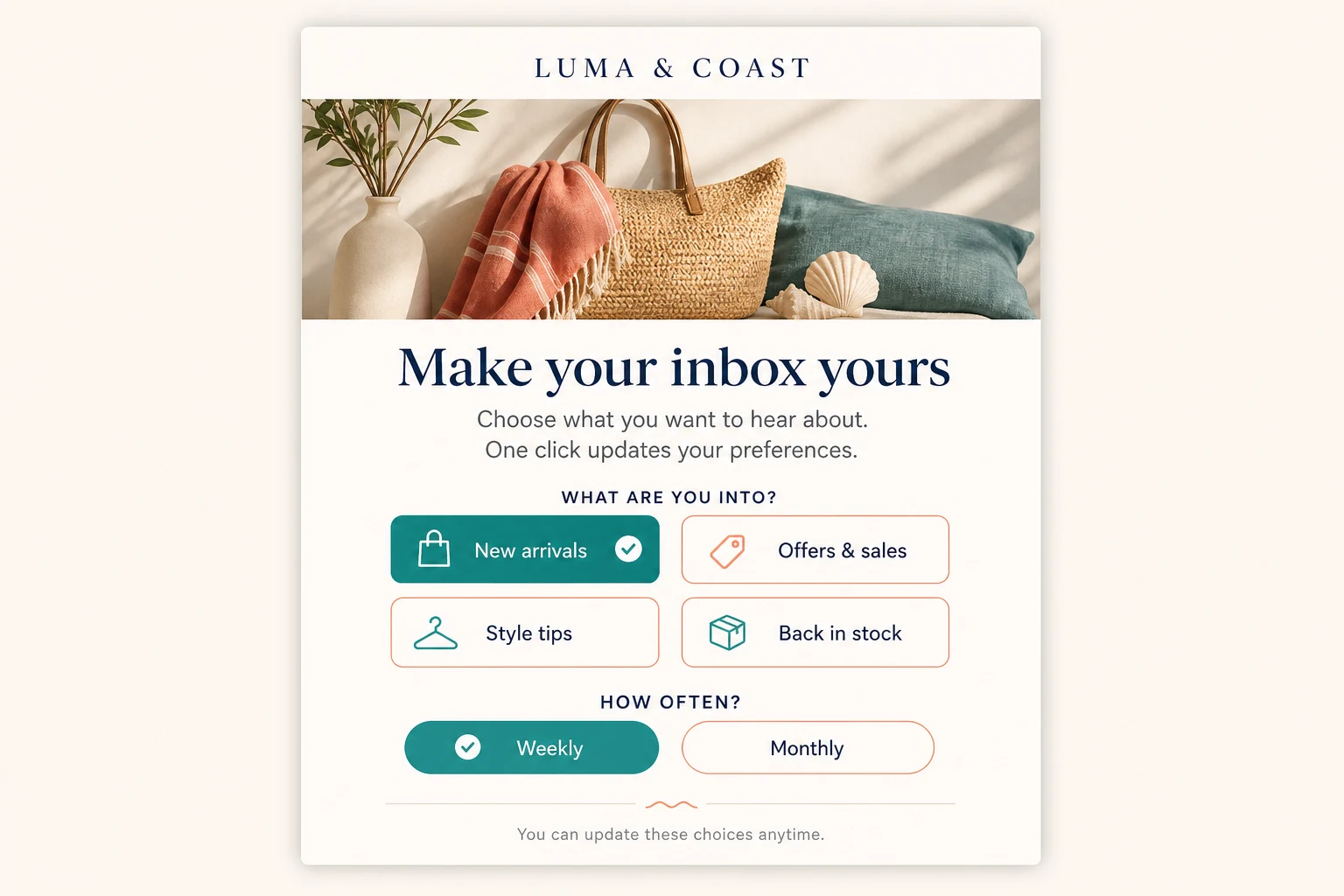
A one-click preference email can present specific topic and frequency choices directly inside the message. This fictional example shows how clear button copy makes each outcome obvious.
One-click preferences are not one-click unsubscribe
The names sound similar, but the two features solve different problems:
| Feature | What happens |
|---|---|
| One-click email preference | A subscriber chooses a topic or frequency from a link in your email |
| Standard manage preferences | A subscriber opens a form, selects options, and saves |
| One-click unsubscribe | A subscriber opts out through the inbox-level unsubscribe control required for bulk senders |
One-click preference links do not replace or interfere with Gmail and Yahoo’s one-click unsubscribe requirements. Your emails still need a clear unsubscribe path, and every opt-out must be honored. Preference links simply give subscribers a faster way to say, “Keep emailing me, but differently.”
For the compliance distinction, read One-Click Unsubscribe Requirements for Gmail and Yahoo.
Why fewer clicks can retain more subscribers
Every extra step creates a chance to lose someone. A subscriber may like the idea of weekly emails, but not enough to open a preference center, scan several fields, choose an option, and submit it.
A specific one-click link reduces the decision to one clear trade:
Keep the content I value, at a cadence I can tolerate.
That is especially useful when the email itself reveals a likely source of fatigue. A daily-sale campaign can offer weekly frequency. A broad newsletter can let readers keep only product announcements. A re-engagement flow can ask subscribers which content is still relevant before inactivity turns into an unsubscribe or spam complaint.
The result is better than a generic “Manage preferences” link because the CTA explains both the action and the outcome before the click.
High-value campaigns for one-click preference links
Let high-frequency subscribers reduce cadence
Add “Switch me to weekly” near the footer of frequent campaigns. This gives fatigued subscribers an immediate alternative to unsubscribing without asking them to leave the email and configure a form.
The preference can then power Klaviyo segments or flow filters so the subscriber receives the cadence they selected.
Ask subscribers which topics they want
Use clear topic CTAs such as “Keep me on new arrivals” or “Send me sales and discounts.” You can add the selected topic to their existing interests or make it their only selected topic, depending on the promise in your copy.
Use additive behavior when the CTA says add me or keep sending me. Use replacement behavior only when the CTA explicitly says only send me.
Improve re-engagement and sunset flows
Before suppressing an inactive subscriber, offer a small set of one-click choices:
- Weekly instead of daily
- New products only
- Promotions only
- Open the full preference center
People who choose an option provide a strong signal that they still want a relationship with your brand. People who do nothing can continue through your normal sunset logic.
Confirm preferences after signup
A welcome flow can ask new subscribers what they want before your sending pattern is established. One click enriches the Klaviyo profile and helps you personalize future campaigns from the start.
How to create a one-click preference link in Last Chance
You do not need to hand-build query parameters. Last Chance generates the links from your active topic and frequency settings.
- Configure your topics and frequencies under Settings → User preferences.
- Connect Klaviyo and route its manage preferences consent page through your Last Chance hosted page.
- Open the One-click preference apply links card.
- Choose one or more topics, a topic mode, and/or a frequency.
- Copy the generated Klaviyo Liquid link into a button or text link in your campaign or flow.
- Send a real test email and click the link to confirm the preference and success message.
You can also copy a ready-made link beside any active topic or frequency. The dashboard uses the correct configured values, which avoids errors caused by manually typed preference slugs.
See the One-Click Preferences guide for the full setup, link examples, and troubleshooting steps.
Write CTA copy that makes the result obvious
The best one-click preference links describe exactly what will change.
Good CTA copy:
- Switch me to weekly emails
- Only send me new arrivals
- Add sales alerts to my preferences
- Send me product updates once a month
Avoid vague CTA copy:
- Click here
- Update
- Save settings
- Learn more
Subscribers should not be surprised that clicking saves a preference. Put the choice in the link text and, when useful, add one sentence nearby explaining that the setting will update immediately.
Measure preference intent separately
Last Chance tracks one-click topic and frequency saves separately from changes made inside the preference form. That distinction helps you answer:
- Which email CTAs generate the most preference updates?
- Are subscribers more likely to change frequency or topics?
- Which one-click choices prevent an unsubscribe later?
- Which segments should receive a different cadence or content mix?
Matching events are also sent to Klaviyo, so one-click choices can trigger confirmation, reduced-cadence, or topic-specific flows.
Measure the downstream result, not just clicks. A successful program should produce subscribers who remain engaged at the frequency and with the content they requested.
Keep the full preference center and unsubscribe path
One-click links work best as shortcuts, not as the only available controls. Keep a full Klaviyo preference center for subscribers who want to review several settings at once. Keep unsubscribe visible and frictionless for anyone who wants to leave.
The goal is not to make opting out harder. It is to make the better-fitting choice easier.
FAQ
Do one-click preference links unsubscribe someone?
No. They save the topic and/or frequency named in the link. They use the manage-preferences path, not the unsubscribe path. A separate, clear unsubscribe option should remain available in every marketing email.
Does the subscriber need to log in or submit a form?
No. Klaviyo supplies the personalized manage-preferences link, and Last Chance validates and applies the requested setting automatically. The subscriber lands on the branded page with a confirmation message.
Can one link change both topics and frequency?
Yes. A generated link can apply one or more topics and a frequency in the same click. Topic choices can be added to existing interests or replace them; frequency always updates to the selected value.
Where are one-click preferences saved?
Last Chance saves them to the subscriber’s Klaviyo profile using the same topic and frequency properties as the full preference form. That means you can use the values in Klaviyo segments, campaign targeting, and flow filters.
Give subscribers a faster way to choose what they receive. Start building one-click preference links with Last Chance →